Keep your Mac awake.
On your terms.
A tiny menu bar utility for macOS that prevents your Mac from sleeping while you're working, presenting, downloading, or rendering. No Dock icon. No clutter.
 Tostato
Idle
Tostato
Idle
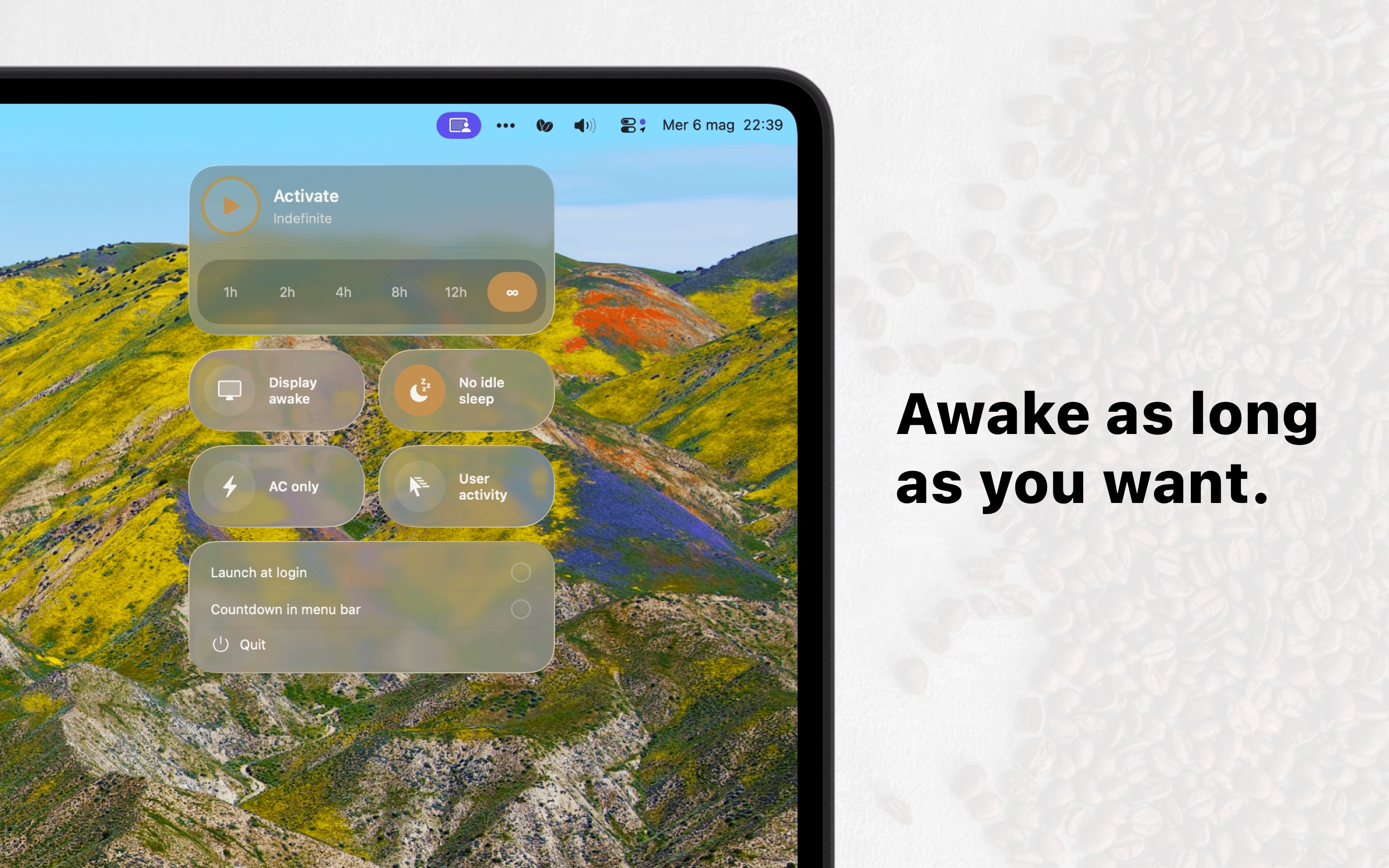
Click the toggles, pick a duration, hit start.
Why this exists
Long Xcode builds. Overnight renders. A presentation that mustn't dim. A 50 GB sync. An AI agent working unattended for hours. macOS goes to sleep when you stop typing — and that's usually fine, except when it isn't.
Tostato gives you four small switches and a timer. Pick what to keep awake, pick how long, walk away. When time runs out, Tostato stops on its own.
What you get
-
Four protections
Display awake, no idle sleep, screensaver suppression, or AC-only. Mix and match. Each enforced independently.
-
Six durations
1, 2, 4, 8, 12 hours, or indefinite. A live countdown shows what's left. When it hits zero, Tostato stops.
-
Live countdown
In the popover, and optionally in the menu bar itself. Glanceable, never noisy.
-
Battery-aware
Pauses automatically on battery when AC-only is part of your selection. Plug back in and it resumes.
-
Liquid Glass UI
Built natively for macOS 26 with the system glass effect. No custom chrome, no lookalike styling.
-
Private by design
No analytics. No tracking. No network calls. No account. Everything stays on your Mac.
How it works
Four steps. About five seconds.
-
Step 01
Click the menu bar icon
A small panel slides down. No window, no Dock icon, no clutter.
-
Step 02
Pick protections
Display, idle, screensaver, AC-only. Any combination.
-
Step 03
Pick a duration
1 to 12 hours, or indefinite if you want to babysit it.
-
Step 04
Hit start
The countdown begins. When it hits zero, Tostato stops automatically.
Private by design
Tostato runs entirely on your Mac. Nothing about how you use it is collected or sent anywhere.
- No analytics
- No tracking
- No network calls
- No account
- No cloud sync
- No telemetry
For the curious
- Platform
- macOS 26.0 or later
- Architecture
- Universal (Apple Silicon + Intel)
- Language
- Swift / SwiftUI
- Power management
- IOKit
IOPMAssertion— the same API macOS uses internally - Sandbox
- Full App Sandbox enabled, no special entitlements
- Distribution
- Mac App Store
- Footprint
- Agent app, ~10 MB on disk
- Languages
- English, Italian, German, Spanish, French
Under the hood, Tostato creates a separate IOPMAssertion for each protection you select, so they're independently enforced by macOS. The user activity option uses IOPMAssertionDeclareUserActivity, re-issued every 45 seconds to stay below the 60-second screensaver threshold. When you stop, every assertion is released cleanly. No background daemons, no kernel hooks, no scripts.
Common questions
Will Tostato drain my battery?
Only if you tell it to. The "AC power" protection is excluded automatically when you're on battery. You stay in control of which protections are active.
Is it safe?
Yes. Tostato uses Apple's official power management APIs — the same ones macOS uses internally. It runs sandboxed, with no special entitlements.
Does it work without an internet connection?
Yes. Tostato never needs the internet, and never makes a network call.
Why doesn't it have a Dock icon?
Tostato is a menu bar app by design. It's meant to be invisible until you need it, then out of the way again.
What happens when the timer hits zero?
Tostato stops automatically and releases every power assertion. Your Mac goes back to its normal sleep behavior immediately.
Can I quit Tostato anytime?
Yes — there's a Quit button right in the popover. Quitting releases every active assertion cleanly.